Posts

Googles Veo3 AI video

Image
AI generative video is moving too fast, this is a preview of Veo3 from Google, that was a stable releas in May 2025. I gave it some simple prompts to see how it would respond, previously with older ai video consistency was an issue,artefacts, and a general lack of performance. What's currently setting Veo3 apart, is that it also generates music, sound and voice in sync with footage. Limited to 8sec clips at 1280x720 with the Gemini app.. Video is watermarked to denote it being AI generated using synthID https://deepmind.google/science/synthid/ Here's 3 clips in different animation mediums - on a theme of environmentalism to see what it would spit out. A scary demonstration that can quickly develop micro shorts or content for explainers with little prompting. For moodboarding and testing ideas this isn't going to go away. Just for comparison , same prompt in RunwayML gen4 As usual some bizarre hallucinations in background, I'm assuming that's a lumberjack. Currently ...

Exploring Unreal 5 for Animatics/Previs

Image
A little summer project to explore quick ideation of a scene - using kitbashed assets and mixamo characters to make a short sequence... Unreal is proving to be a great tool to explore cinematography and lighting in a quick sandbox - there's lots of room to develop some teaching material around filmmaking using Unreal - as well as its own outputs for Virtual Production / Machinema as its own medium... 

Using a Gamepad to control a Tooll3 visual

Image
 Continuing to explore novel inputs for visuals - this is using an Xbox Wireless Controller... This was the intial test - using MJoy and LoopMidi to create the midi remapping from the joystick to be picked up as a midi device in Tooll3. The only limitation with MJoy - is that the window needs to be active to be sending an output... This next version is using the gamepad to change a fractal image - which is used to drive a ImagetoPoint operator in tool - as the starting point of the further repeats to make a 'nebula' type visual - that is controlled by both joysticks... The Graph Layout in Tool... Using MJoy - 1. setup up the joystick axis / button , and a unique midi control/note 2. Click the + to add this to your mapping of controls. Repeat...

Tooll3 to Unreal via Spout

Image
Using  Offworld's Streaming plugins  for Unreal, set up a spout receiver in unreal, to pick up the steam from Tooll using their spout output. Setting the unreal spout receiver to a render texture and using this in a custom masked material, adds the transparency and blend extra colours. To reduce the lag, Tooll was outputting 1024x1024px image as RGBA8bit.

More inputs to Tooll3 ( Leapmotion & ComfyUI/NDI )

Image
The quick setup of Tooll3, inspires creative play to think of ways to interface interactively with Visuals. As i get to learn the software, it's good to get old devices out and think about their potential. Great to see that my Leapmotion v1, that's been stuck in a box for years still works a treat. In this test , using Geco  which converts Leapmotion camera into gestures that can be outputted as Midi and LoopMidi to create a midi port to connect some outputs that can be picked up and trained in Tooll , to manipulate a realtime cube. Another exploration was following on with NDI outputs/inputs - this time from ComfyUI  with a custom NDI node to send a texture to Tooll3 - to explore a setup for GenerativeAI images used in Tooll3. With each nudge forward, keeping thoughts to how to virutally puppeteer content in the future.

Tooling about with Tooll3 - realtime motion graphicss ( osc )

Image
For the last few weeks - I've been exploring the amazing T3 - TOOLL 3.9 -  TOOLL3 - Open Source Motion Graphics here's Tooll's mission statement .... TOOLL3 is an open source software to create realtime motion graphics. We are targeting the sweet spot between real-time rendering, graph-based procedural content generation and linear keyframe animation and editing. This combination allows… artists to build audio reactive vj content use advanced interfaces for exploring parameters or to combine keyframe animation with automation Technical artists can also dive deeper and use tool for advanced development of fragment or compute shaders or to add input from midi controllers and sensors or sources like OSC or Spout. We hope to bring together a community of artists, developers and creative tinkerers to drive the design and development of the software as a free open source project. Here's a bit of mucking about with the Audio Reaction and Triggering events with Midi.. the node ...

TouchOSC to Unreal 5

Image
Playing with TouchOSC to create an external interface on an iPad that can control content in Unreal 5. OSC ( open sound control ) can use simple float value data that can be sent across your network to trigger events. This opens up loads of potential for live experiences and virtual production uses. Just need a bit of time to research and experiment with some ideas. This was adapted from a great introductory tutorial by Aiden Wilson, found here - https://youtu.be/9CkKPCBys44 Blueprint of OSCSetup TouchOSC can be downloaded from  https://hexler.net/touchosc For the OSCserver - in Unreal set the IP address to 0.0.0.0 or empty, but listening on port 8000 ( or similar port not being used by other apps / hardware ) In the TouchOSC HOST setup , look for the IP address of the PC - use command prompt to find it - ipconfig should reveal the IPv4 address The Blueprint listens for messages sent via OSC - which can be broken down to Events. - In the event you can recieve you the float value ( ...

360 Experiences - made for UnCommons #2

Image
Blast to the past - on 8th December 2016, for  UnCommons #2   , I created several immersive 360 Experiences using After Effects and 360 photo. These virtual christmas Babules which the audeience could step into using their smartphones were developed for an UnCommons event at the Delius Center / Artworks Creative in Bradford. This was an after party event of the Wearable Tech event at the Bradford Media Museum. At the event - which was also a silent disco - audience members via a QRCode in the building could launch the 360 videos for playback on their phone, or with a google cardboard headset. The sonic collaboration was with Dr. Marlo De Lara - who developed the synthetic soundscapes - some of the audio was used to create audio reactive visuals in some of the Baubles, or in general evoke the visual qualities that were created for the bauble's - elements of fragmentation, drifting, loss of equilbrium. De Lara produces textural compositions which develop from micros...

Adobe Character Animator / Unreal 5 Mashup

Image
Lots of potential here - having Adobe Character Puppets playing live into an Unreal Environment - this opens up opportunities of Cartoon Digital Puppets for Live Shows and Immersive Theatre. The setup here - is piping in a live feed generated from Adobe Character Animator - using Mercury Transit - picked up using NDI - to pipe it into Unreal as a video texture with Alpha Channel. NDI Tools - is available to download here - https://ndi.video/type/ndi-tools/ you then need to install the NDI Unreal SDK - you will need to fill in an email form to recieve a link. an alternative would be Off Worlds - Toolkit - that has NDI streaming - https://offworld.live/resources/download-center here's an old tutorial that shows the basics of setting up a NDI reciver and material in Unreal.  

Playing with Unreal 5 - Motion Graphics

Image
Over the year - I have been dabbling around with Unreal to get a sense of how to use it for Realtime  Motion Graphics - and particularly Audio Reactive visuals. Niagra Particles were a great area to investigate that had much flexibility to explore and easy(ish) to setup with Blueprints. Above is a simple Niagra Setup - rendering meshes at each particle point, this was a great place to start to get my head around the power of this system in Unreal 5 and see how far I could push my computer with realtime rendering. Using Sam Schreuder's Niagra Particle tutorial example - which can be found here -  https://www.youtube.com/watch?v=UETAS5g-q4M&t=0s  - you can quickly setup the basics of sound reaction that effects properties of the particle emitter. Short tutorial - and covers the fundamentals to investigate further. Only downside of this method - is that it is in game audio - rather than a live feed coming in from a linein/microphone ( that's on the todo list to explore )...

Metahuman 2.0 - Using Raw Camera input

Image
This quick explore is using the facetime camera on an Ipad Pro ( gen 2 ) to capture video and depth - to then post process onto a Metahuman facerig. This method though not realtime - allows for more subtle performance in the facial muscles. The process doesn't take too long and allows for editing of the sequences easily and Retargeting the data onto other Metahumans 2 rigs. The Gen 2 Ipad pro - isn't recommend as supported by Unreal LiveLink Apple Device - but so far it seems to behave appropriately. In terms of online support - Epics own Development support gets you quickly up and running - which you can find here -  https://dev.epicgames.com/documentation/en-us/metahuman/metahuman-documentation

Digital Puppets

Image
It's been a while since I've journaled my interests and research... a big area when I get time to explore is Digital Puppets... this has continued to be growing as an area for the last few years, with lots of subvertable content like SparkAR or SnapChat Filters - through to the explosion of Vtubers. Anywho, the big moment in the summer of 2021 - was the release of Metahumans for Unreal Engine Some impressive visual quality harnessing the Unreal Engines Realtime Rendering... the TrackingApp on the Ipad - Live Live Face that gives cheap realtime facial tracking that can be mapped onto the Metahuman, or any appropirately rigged character in Unreal. The Metahuman experience itself is reminicent of Adobe Fuse and Autodesk Character Generator of old - just taking it to the next level of rigging, blend shapes and some excellent hair simulation - so this isn't a revelation in itself - but is part of the evolution of creating a Digital Human / Clone. Quixel bridge is the to...

Using Adobe Character Animator in Microsoft Teams or other conference tools

Image
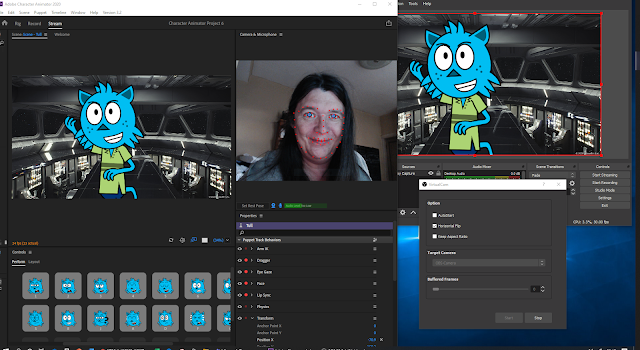
Mini win of the Day! For my usual tinkering around on some level of research for teaching - I finally sat down to figure out how to use Adobe Character Animator into Microsoft Teams, without having to output as a stream from the program into Youtube or Microsoft Streams... To the rescue - the ever useful OBS Studio was used to bridge and capture the display output from Adobe Character Animator ( my trick was to capture the 2nd monitor display using OBS ). So far so good, the key is to download a plugin for OBS - called Virutal Camera - download link here and install it... https://obsproject.com/forum/resources/obs-virtualcam.949/ With this enabled in OBS - the studio output can be activated as a Camera Feed in your Teams or Zoom software ( so change your device settings to accomodate this ) I'm still playing with the setup - to improve latency and sync with sound... but its a fun alternative to having not to comb my hair for those crucial meetings! - When its perfected - I...

Folding @ Home

Image
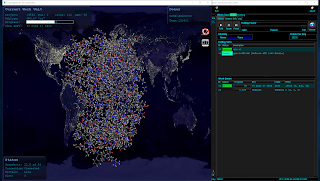
Folding@home is a project focused on disease research. The problems they're solving require so many computer calculations – and they need your help to find the cures! Folding? Folding refers to the way human protein folds in the cells that make up your body. We rely on the proteins to keep us healthy and they assemble themselves by folding. But when they misfold, there can be serious consequences to a person’s health. The Folding@home software allows you to share your unused computer power with us – so that we can research even more potential cures. As an Animation Community - we have some powerful computers at hand for rendering and working on creative projects - when these machines are idle - help put them to use to help support cures for Covid-19 and other High Priority Diseases. https://foldingathome.org/  to download the App for PC / MAC or LINUX Please join Team Animates - to combine our efforts and see our impact... Team Number is 263901 Keep Well ...

Exploring MASH & BOOL for Maya 2018

Image
MASH is a plugin that has been with Maya for a while now. Developed by Mainframe  - MASH adds a host of tools for speedy development of Motion Graphics similar to Cinema 4D - check out this video to get a flavour of what it can do >> link   There is plenty of useful tutorials provided by them too. Finally had a few days free to play catch up with MASH and an additional plugin BOOL ( also developed by Mainframe ) , since they added Dynamics in the MAYA 2018 edition. Here's a few examples of what it can do : In the above example - this is made using the Audio and Trails Nodes to create a Plexus like network. The 360 render is achieved by using the new VR mode ( or spherical if your using 2017 ) in the Arnold options of your camera properties. This example uses the Flight Node - which mimics swarming, flocking and schooling of a group of objects. A Signal Noise Node was added to make it look like the paperplanes were being buffeted by the wind. The ba...

360 Animation for Vespertine #15

Image
On October 19th 2016, 'Zoom Through' was presented at National Center of Early Music, York. This was a project commission by Vespertine, National Center of Early Music & AOC Archeology . The 360 animation was an abstract/artistic response to the historic space been scanned by LIDAR  equipment. This was then released on YouTube after the event, creating an artefact that had a life after the Event day. The LIDAR dataset produced by AOC Archeology was over 40 million point model of the Church, that is the home of the National Center of Early Music. Using MeshLab, this was reduced to around 500,000 points, so it could work efficiently in Trapcode Form without memory errors, it also created the 'x-ray' aesthetic of the animation, by having the point cloud resolution low enough to see through the walls and columns. To produce the equirectangular video output for 360, the plugin Mettle Sykbox studio was used in After Effects to render the Trapcode Form object. This...

Exploring AR with Vuforia and Unity

Image
Playing catchup on fundamental skills in Augmented Reality. This test was done using the vuforia plugin for Unity - to export as an Android App. Using tutorials from here as a starting point - https://developer.vuforia.com/downloads/samples  , it was quick to get up and running..  ( More time was spent trying to get the Nexus 7 to play ball with Windows 10, grrr! ) The tracking target was a postcard, which you need to upload an image of to the Vuforia database to create tracking information. Vuforia is free, if you are happy for watermarking on the app. You also have to create an app license that you copy and paste into the Unity project to register it. Having a dabble also gave an opportunity to utilise Mixamo  to generate a 3D animated character to test with. Mixamo has now been added to the Adobe Cloud services - so there's pre-made animations for Adobe Fuse Characters - that can be exported as .fbx. As a conceptual idea - I added particle trails to the da...

Playing with a new Toy - Ricoh Theta S

Image
Finally got round to getting something affordable to do 360 video and photospheres, without the crazyness of putting multiple Go-Pros together or something similar. Inside the Stop Frame Animation set.. @lcabaan @leedscofart #theta360uk - Spherical Image - RICOH THETA The camera is a Ricoh Theta S , it retails around £299 -  which is just in my price range for experimental play and research.  Quality wise, its never going to be great - you are getting what you are paying for, - video is 1920x960px - which is low and soft for a 360youtube - but more than adaqute for prototyping ideas for storytelling. Picture wise though - images are 5376 x 2688px, which enables 4k quality timelapse and stopmotion projects. Here's a youtube test below... In an educational context, the Theta S is a good accessible 360 camera. Photos are exported as equirectangular projection - so easy to to import into Photosphere apps, or use as Skyboxes in Unity. Video needs to ...

Exploring Kinect and Isadora

Image
Further exploration of investigating Isadora for incorporating into visual projects, I and Devika Rao experimented at The Stage, Leeds University with the trial version. Most of this was to test the robustness of the technology, and trying out the Kinect/Isadora Tutorial - http://troikatronix.com/support/kb/kinect-tutorial-part1/ It was fun to explore the software with some one unfamilar with the technology, so seeing the playful interaction and discovery through someone else is encouraging. Particularly mirroring effects, which was good for Devika to interact with live. Certain things flagged up quickly - skirts and dresses effect the quality of the kinect tracking - which might be an issue for costumes for Indian Classical Dance work. Also the area of the kinect's sensor pick up - reduces the space for dancing in. For quickly prototyping and discussing ideas for future visuals, it is obvious that Isadora can be an excellent addition - previously - I would have to shoot foota...

Playing with Isadora

Image
Finally, after many years - sitting down and trying to get my head around Isadora by Troikatronix. What drew me back to the software was the addition of projection mapping tool called IzzyMap and the slightly updated node based interface. Here is a test I put together using the trial version of Isadora - I had to make Kaleidoscopes, just had to. I'm checking out the midi input to trigger video clip switching, and a midi controller to play with values, the rest is audio reactive - pulling sound input from Youtube, using Stereo Mix switched on the sound card ( so no need to use a virtual audio cable ). Isadora Patch Video playback would benefit from using an SSD in my laptop, Isadora claims I can support 8 HD files at once with that Configuration. FreeframeGL gives me access to bringing in material with  Spout  - the windows equivalent of  Syphon . Hopefully this will allow me to bring in Processing Sketches, and in the longrun - Unity based screen content. N...